 ef1bfdc57a
* feat(pdf): implement native text highlighting and interactive selection menu

- Add `PdfUserHighlight` data model to track page index, character ranges, and normalized coordinates.
- Redesign `PdfSelectionMenuPopup` to match the EPUB reader style, featuring a color palette row and a deletion option.
- Integrate highlight rendering into the `PdfPageSelectionsLayer` using Canvas drawing.
- Add hit-testing to `detectTapGestures` to allow users to tap existing highlights to change colors or remove them.

* Implemented PDF highlight persistence, sync, and exporting.

* Improved PDF highlight exporting and visibility logic

- Fixed PDF highlight rendering by correctly calculating coordinates and merging adjacent rectangles into lines.
- Updated `PdfExporter` to include highlights in the exported document and added debug logging.
- Corrected visibility check in `PdfPageComposable` to account for vertical offsets.
- Enhanced `PdfViewerScreen` highlight creation to use merged line rectangles

* Refactored annotation synchronization logic and improved background sync reliability.

- Refactored JSON bundle creation and extraction into reusable helper functions.
- Improved stale file detection by checking all annotation types (ink, text, layout, highlights, text boxes).
- Added background annotation downloading to `SyncWorker`
- Implemented duplicate file cleanup in `GoogleDriveRepository` during uploads.
- Added a `showFeedback` flag to `syncFolderMetadata` to control UI visibility during background operations.
- Fixed a potential data loss edge case by aborting Firestore sync if the bundle upload fails.

* Improved highlight interaction and management in PDF viewer

- Implemented hit tolerance for highlight selection to improve touch detection accuracy.
- Added logic to shift highlight page indices when adding or deleting pages.
- Included highlights in the auto-pruning check for empty pages.
- Added a "Highlights" tab to the navigation drawer to list, navigate to, and delete user highlights.
3.2 KiB
 Episteme Reader
A native Android document reader application built with Kotlin and Jetpack Compose.

Overview
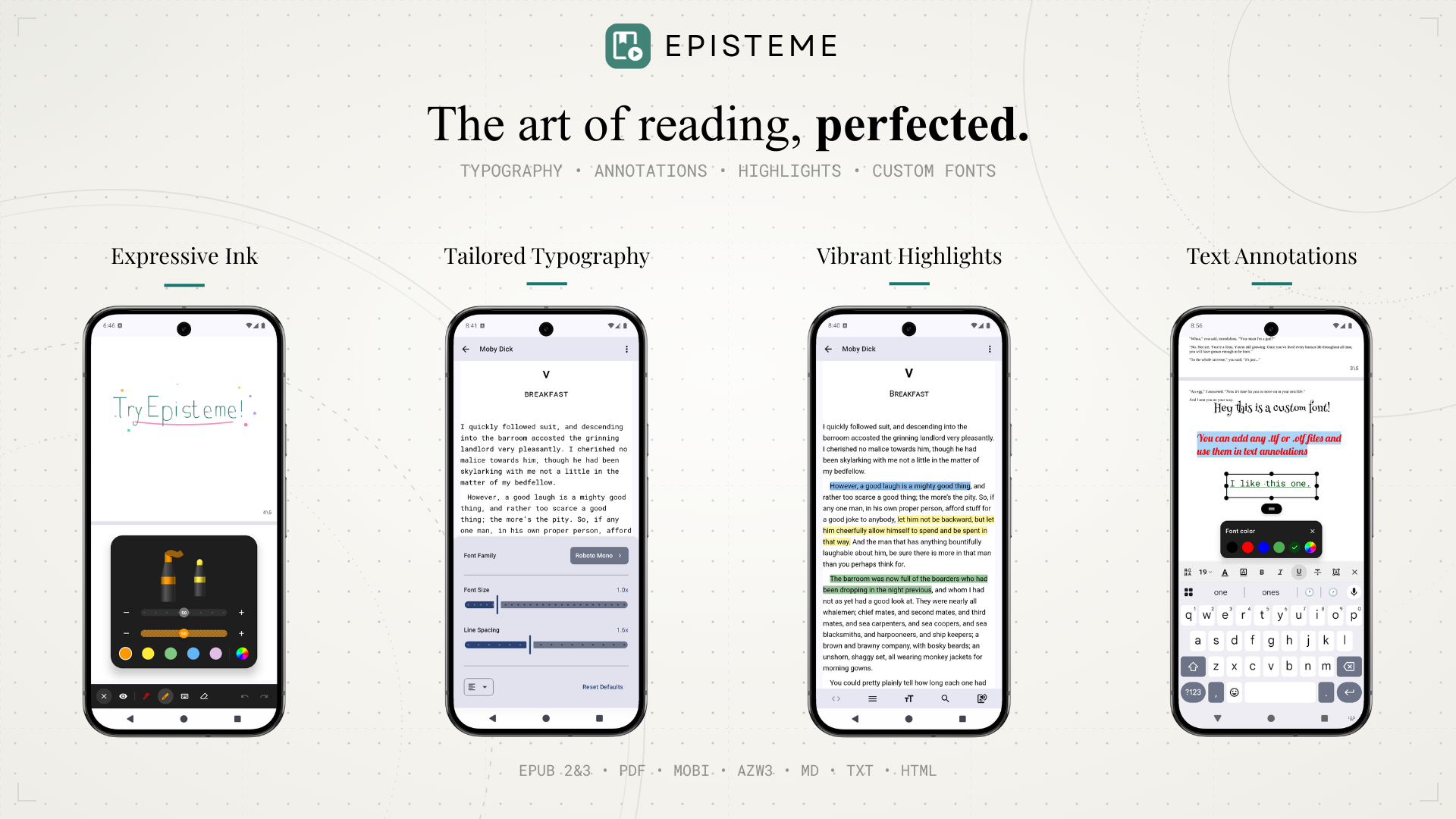
Episteme Reader is an offline-first application designed for reading various document formats. It leverages native Android technologies and C++ libraries to provide a performant reading experience with customization capabilities.
Note: This is the Open Source (OSS) edition of Episteme Reader. The version available on the Google Play Store is built from this core but includes additional proprietary features.
Features
Supported Formats
- Documents: PDF
- E-books: EPUB, MOBI, AZW3
- Text: MD, TXT, HTML
PDF Features
- Viewing Modes: Vertical Scroll and Paginated view.
- Ink Annotations: Draw directly on pages using Pen, Highlighter, and Eraser tools.
- Text Annotations: Add text notes anywhere on the page using system or custom fonts.
E-Book Features
- Parsing: Native parsing for MOBI/AZW3 via
libmobiand EPUB viaJsoup. - Customization: Adjust font size, line spacing, and margins.
- Custom Fonts: Support for importing user-provided font files (
.ttf,.otf).
General
- Text-to-Speech (TTS): Read documents aloud using the system TTS engine.
- File Management: Built-in library organization.
Architecture
- UI: 100% Jetpack Compose (Material3).
- Architecture: MVVM with Unidirectional Data Flow.
- Database: Room (SQLite) for metadata and annotations.
- PDF Engine:
pdfium-android(Native PDFium bindings). - EPUB Engine: Utilizes standard
WebViewfor vertical scrolling mode, and a custom rendering engine for paginated mode. - Mobi Engine: Custom JNI bindings to
libmobi.
Building from Source
-
Clone the repository:
git clone https://github.com/Aryan-Raj3112/episteme.git cd episteme -
Build: Open in Android Studio and run the
ossDebugvariant../gradlew assembleOssDebug
Open Source Libraries
This project is made possible by the Android open-source ecosystem:
- Core & UI: AndroidX, Jetpack Compose, Kotlinx Serialization
- Document Engines: PdfiumAndroidKt (PDF), libmobi (MOBI/AZW3), Google WOFF2 (Fonts)
- Parsers: Jsoup (HTML/EPUB), Flexmark (Markdown)
- Media & Image Loading: Coil, Media3 (ExoPlayer)
- Utilities: Room (Database), Timber (Logging)
License
This project is licensed under the GNU Affero General Public License v3.0 (AGPL-3.0). See the LICENSE file for details.
Support
If you find Episteme Reader useful and want to support its development, consider sponsoring.
