 d7a9cae9e1
* Add performance and stylus debugging logs * Refactor and decouple UI models from `MainViewModel` * Refactor library state management and projection logic * Implement desktop shell using Compose Multiplatform * Implement desktop shell using Compose Multiplatform * Implement desktop shell using Compose Multiplatform * Introduce ReaderEngine and enhance EPUB reader features in windows app * Move core paginated reader logic to a Kotlin Multiplatform `shared` module and introduce experimental desktop support. * Implement PDF rendering and text extraction for desktop using Pdfium * Add `NonReaderScreens.kt` and UI dependencies * Refactor and centralize library state management and models to improve cross-platform consistency * Implement JSON persistence for desktop library and enhance library management features including shelf CRUD, tagging, and metadata editing * Implement PDF annotation system and enhanced zoom controls for the desktop viewer * Implement WebView-based EPUB rendering for desktop using CEF and embedded resources * Optimize UI state projection, navigation state handling, and main screen pager performance * Implement Bring Your Own Key (BYOK) support for AI features in OSS version * Support Gemini-based Cloud TTS with BYOK support for OSS builds * Refactor table cell image sizing in `PaginatedReader` and improve `MobiParser` native library loading and error handling. * crash fixes * Enhance navigation stability with lifecycle-aware safety checks and update `navigation-compose` to 2.9.6 * Implement dynamic bottom padding for the page info bar to account for device rounded corners * Implement bidirectional jump history navigation and replace the jump-back pill with a dedicated `PdfJumpHistoryBar` * Optimize PDF tiling performance and refine pan-and-fling gesture handling * Implement customizable toolbars with drag-and-drop reordering and placement for PDF and EPUB readers * Updated UI for customize toolbar * Refine drag-and-drop reordering and section assignment for PDF and EPUB reader controls * restructure PDF viewer UI component hierarchy to fix verifier crash * Implement separate text dimming factors for light and dark themes * Synchronize Pdfium access and improve resource lifecycle safety across Kotlin and native layers * Enhance image alignment in paginated and EPUB readers through anchor detection and style-based positioning * Centralize file type resolution logic and implement HTML sanitization during import * Introduce vertical margin customization and configurable progress bar positioning * texture support in epub reader * Enhance TTS session management, progress tracking, and diagnostic logging * Optimize library state projection and folder synchronization performance by refactoring collection lookups and refining metadata extraction logic. * Refine TTS page mapping for PDF and overhaul TTS control UI * Implement natural session completion logic in `TtsPlaybackManager` for cloud tts * Replace Snackbar with `CustomTopBanner` for notifications in `PdfViewerScreen` * Refine TTS playback continuity across PDF pages and improve state management for session transitions * Implement global texture transparency and enhance textured theme support across PDF and EPUB readers. * Update reader themes and improve texture rendering in page animations, EPUB UI, and immersive mode * Add Support Project screen * Optimize library performance via projection caching, batch database updates, and scoped folder synchronization. * Enhance folder synchronization with fallback query mechanisms and refactor annotation sidecar importing logic * Bump version to 1.0.47 (51) |
||
|---|---|---|
| .github | ||
| .idea | ||
| app | ||
| desktopApp | ||
| docs | ||
| fastlane/metadata/android/en-US | ||
| gradle | ||
| shared | ||
| spotless | ||
| .gitattributes | ||
| .gitignore | ||
| build.gradle.kts | ||
| CLA.md | ||
| CONTRIBUTING.md | ||
| gradle.properties | ||
| gradlew | ||
| gradlew.bat | ||
| LICENSE | ||
| README.md | ||
| settings.gradle.kts | ||
 Episteme Reader
A modern, offline‑first, privacy‑focused document & e‑book reader for Android, built with Kotlin and Jetpack Compose.



Overview
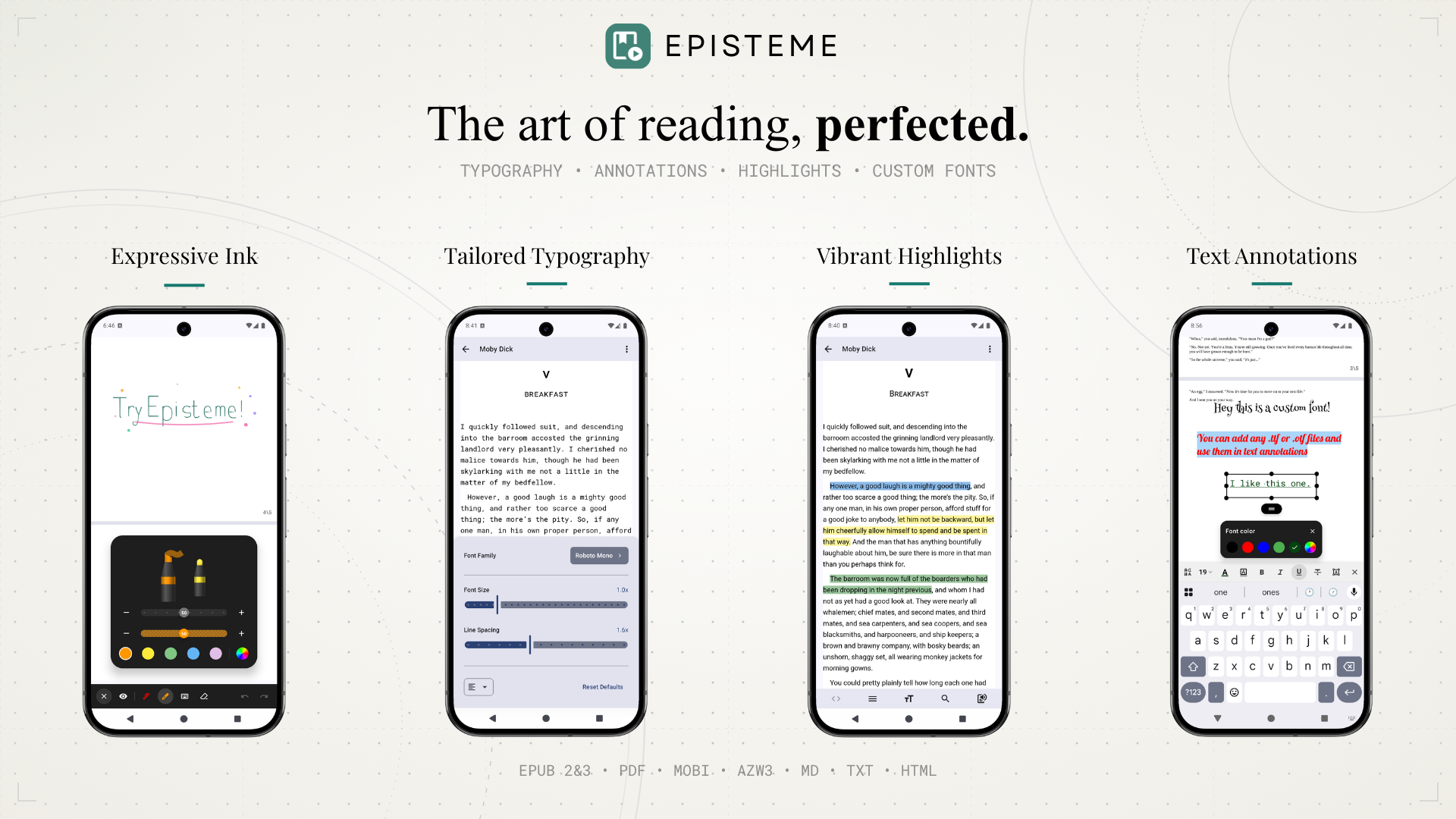
Episteme Reader is a comprehensive, customizable reader for documents and e-books on Android. It features a modern Jetpack Compose UI, powerful reading tools, and extensive theming.
To best serve different user preferences regarding privacy and network usage, Episteme Reader is available in three distinct editions:
- PlayStore Version: The full-featured release which includes proprietary code and features.
- OSS Version (GitHub/F-Droid): A fully open-source build.
- OSS Offline Version (GitHub): A strictly offline build with network permissions completely removed.
Feature Comparison
📚 Supported Formats
| Feature | PlayStore | OSS | OSS Offline |
|---|---|---|---|
| Documents: PDF, DOCX, ODT/FODT | ✅ | ✅ | ✅ |
| E-books & Text: EPUB, MOBI, AZW3, FB2, MD, HTML, TXT | ✅ | ✅ | ✅ |
| Comics: CBZ, CBR, CB7 | ✅ | ✅ | ✅ |
| View-Only: CSV, TSV, JSON, XML, Logs, Code Files | ✅ | ✅ | ✅ |
📖 Core Reading Experience
| Feature | PlayStore | OSS | OSS Offline |
|---|---|---|---|
| Display Modes: Paginated & Vertical Scroll | ✅ | ✅ | ✅ |
| PDF Multi-Tab Reading & Reflow | ✅ | ✅ | ✅ |
| PDF Annotations: Ink (Pen, Highlight, Erase) & Text | ✅ | ✅ | ✅ |
| App-wide Customization & Reader Theming | ✅ | ✅ | ✅ |
| Custom Fonts: Local Import (TTF and OTF) | ✅ | ✅ | ✅ |
| Typography Control | ✅ | ✅ | ✅ |
| Auto-Scroll & Musician Mode | ✅ | ✅ | ✅ |
| System Text-to-Speech (TTS) | ✅ | ✅ | ✅ |
⚙️ Advanced & Network Features
| Feature | PlayStore | OSS (F-Droid) | OSS Offline |
|---|---|---|---|
| Local Folder Sync & Library Management | ✅ | ✅ | ✅ |
| Download Google Fonts | ✅ | ✅ | ❌ |
| OPDS Catalog Support | ✅ | ✅ | ❌ |
| PDF Bubble Zoom Magnifier | ✅ | ❌ | ❌ |
| ML Kit OCR (Scanned PDF Text Selection) | ✅ | ❌ | ❌ |
| Cross-Device Cloud Sync | ✅ | ❌ | ❌ |
| AI Tools (Summaries, Story Recap, Dictionary) | ✅ | 🔜 | ❌ |
| Cloud Text-to-Speech | ✅ | 🔜 | ❌ |
Building from Source
-
Clone the repository:
git clone https://github.com/Aryan-Raj3112/episteme.git cd episteme -
Build:
- Open in Android Studio and run the
ossDebugorossOfflineDebugvariant, or - Build from the command line:
./gradlew assembleOssDebug
The APK will be generated at:
app/build/outputs/apk/oss/debug/Episteme-oss-v{version}-oss-debug.apk - Open in Android Studio and run the
Open Source Libraries
Powered by the Android OSS ecosystem:
- Core & UI: AndroidX, Jetpack Compose, Kotlinx Serialization
- Document Engines: PdfiumAndroidKt (PDF), libmobi (MOBI/AZW3)
- Parsers: Jsoup (HTML/EPUB), Flexmark (Markdown)
- Media & Image Loading: Coil, Media3 (ExoPlayer)
- Utilities: Room (Database), Timber (Logging)
Contributors
| Contributor | Contribution |
|---|---|
 CCerrer CCerrer |
Testing & QA |
 ottozumkeller ottozumkeller |
Translation (German) |
 TURBOKANTR TURBOKANTR |
Translation (Turkish) |
 eyadalkordy24 eyadalkordy24 |
Translation (Arabic) |
 berebara berebara |
Translation (Russian) |
 mh4ckt3mh4ckt1c4s mh4ckt3mh4ckt1c4s |
Translation (French) |
Translations
Help translate Episteme Reader into your native language! Weblate is used to manage localization.

License
Licensed under the GNU Affero General Public License v3.0 (AGPL‑3.0). See the LICENSE file.
Support the Project
Help make Episteme Reader even better:
- ❤️ Support on Patreon
- ⭐ Star the repository to help visibility
- 🐞 Report bugs or request features via GitHub Issues
- 💬 Share feedback in Discussions
- ✍️ Leave a review on the Google Play Store
- 📣 Tell a friend!